Well ... Of course you know some of them ... Here are they ...
1. When you install Silverlight toolkit, a sample page gets into your machine: You can open the page and have a quick look at the controls. Default location is ...
C:\Program Files\Microsoft SDKs\Silverlight\v4.0\Toolkit\Apr10\Samples\default.htm
You also get the toolkit document in
C:\Program Files\Microsoft SDKs\Silverlight\v4.0\Toolkit\Apr10
2. My domain hosting company doesn't support .xap MIME type: The solution is to change your .xap extension to .zip and it will work. Don't forget to change this in the Object tag source param also. One tiny problem with this approach is that your Splash screen (That you built using plain old XAML and JavaScript) won't work.
3. MouseLeftButtonDown event is not fired when there is no background specified: When you write an mouse event in a Panel you need to specify some background. So if you want to make the background transparent add Background="Transparent" instead of leaving it blank. This is true for other FrameworkElements too (Like Fill in Rectangle)
4. You can specify your custom xml namespaces with default url: You need to add XmlnsDefinitionAttribute in AssemblyInfo.cs file and give an unique url as xml namespace. For example [assembly:XmlnsDefinition("http://mrgni.com","TestLibrary")]
5. You can go full-screen automatically: Well only for Out of Browser applications with elevated trusts. And guess what? All keyboard controls work there.
6. There is no cross domain restriction when your application runs in elevated trust: Well isn't it nice? For elevated trust you can work with COM components. Specially helpful for working with Microsoft Office documents. But whatever you do You can not go Administrator mode in elevated trust mode.
Thursday, September 9, 2010


Monday, June 28, 2010
Zakumi Fan Club Is Live
My first hobby website goes online. You can see it live in http://mrgni.com
[ UPDATE: ZFC is selected in Silverlight showcase. ]
It is made with Silverlight 4.
You can get the full source code [ Except the database connection string. ] in codeplex.
Features...
1. There are 4 main tabs in the site. Teams N Results, About ZFC, Gallery and News.
2. Teams N Results shows the information/standing of teams, groups, schedule and next match in local time.
3. About ZFC is stuffed with FAQ and information about the site and Zakumi.
4. Gallery shows photos related to current world cup. It also has an option to like this application and share this in Facebook if you connect with Facebook.
5. News tab displays what people are saying related to FIFA in Facebook and twitter. It also gives you the facility to search in those sites. If you login with Facebook you get an option to see what your friends are saying about the current World cup. It also shows news from FIFA website feed.
Development story ...
Design ...
I have started this project long time back. The initial problem I faced is to finalize the design ... It was like ...
1. You create a new design
2. Make it live [ Make the user interface in xaml ]
3. Show it to your friends.
4. Scrap it.
5. Go to step 1.
Here are the things I listed down before starting the project
[ And here is what it has become when I finalized the design ]
1. The background will be light and text dark.
[Opposite. Though I tried to maintain the contrast. ]
2. It should fit in any browser resolution. [ Lower limit 1024 x 768 ]
[It was so difficult that finally I made it 998px wide. Though it should not look bad at higher resolutions ]
3. All texts and fonts should be highly readable.
[ Most of the time yes. In a few cases no. ]
4. There must be a logo.
[There is. This is what you can create within an hour or so. It looks pretty horrible. ]
Here was the design I came up with, at my second try ...
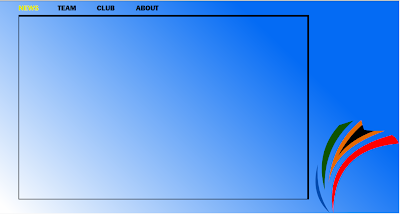
And here how it looks after its finished ...
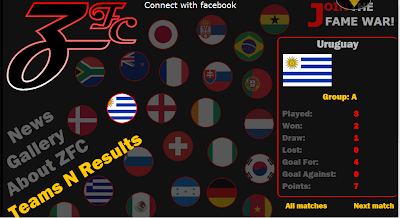
Both of them are direct screen shots of live site ... not the photoshop mock design.
Development ...
Source control: Used TFS 2010 with codeplex as source control. And believe me it helped me a lot more than what I initially expected.
Connect with Facebook: I am using Facebook Developer Toolkit for it. The problem is it uses the old Graph API and has some small bugs in it. Also it is a heavy weight library that is not required for my website.
Animations: The site is pretty dull. There are only a few very simple animations. It is mainly because of lack of planning and time.
Web services and Database: I am using WCF services and MS-SQL server for DB. ADO.NET entity models as ORM. It went smoothly but there are some improvements can be done.
[ The website is not updated with the latest results and 2nd round matches yet ]
Thanks,
Tanmoy
[ UPDATE: ZFC is selected in Silverlight showcase. ]
It is made with Silverlight 4.
You can get the full source code [ Except the database connection string. ] in codeplex.
Features...
1. There are 4 main tabs in the site. Teams N Results, About ZFC, Gallery and News.
2. Teams N Results shows the information/standing of teams, groups, schedule and next match in local time.
3. About ZFC is stuffed with FAQ and information about the site and Zakumi.
4. Gallery shows photos related to current world cup. It also has an option to like this application and share this in Facebook if you connect with Facebook.
5. News tab displays what people are saying related to FIFA in Facebook and twitter. It also gives you the facility to search in those sites. If you login with Facebook you get an option to see what your friends are saying about the current World cup. It also shows news from FIFA website feed.
Development story ...
Design ...
I have started this project long time back. The initial problem I faced is to finalize the design ... It was like ...
1. You create a new design
2. Make it live [ Make the user interface in xaml ]
3. Show it to your friends.
4. Scrap it.
5. Go to step 1.
Here are the things I listed down before starting the project
[ And here is what it has become when I finalized the design ]
1. The background will be light and text dark.
[Opposite. Though I tried to maintain the contrast. ]
2. It should fit in any browser resolution. [ Lower limit 1024 x 768 ]
[It was so difficult that finally I made it 998px wide. Though it should not look bad at higher resolutions ]
3. All texts and fonts should be highly readable.
[ Most of the time yes. In a few cases no. ]
4. There must be a logo.
[There is. This is what you can create within an hour or so. It looks pretty horrible. ]
Here was the design I came up with, at my second try ...

And here how it looks after its finished ...

Both of them are direct screen shots of live site ... not the photoshop mock design.
Development ...
Source control: Used TFS 2010 with codeplex as source control. And believe me it helped me a lot more than what I initially expected.
Connect with Facebook: I am using Facebook Developer Toolkit for it. The problem is it uses the old Graph API and has some small bugs in it. Also it is a heavy weight library that is not required for my website.
Animations: The site is pretty dull. There are only a few very simple animations. It is mainly because of lack of planning and time.
Web services and Database: I am using WCF services and MS-SQL server for DB. ADO.NET entity models as ORM. It went smoothly but there are some improvements can be done.
[ The website is not updated with the latest results and 2nd round matches yet ]
Thanks,
Tanmoy
Monday, February 8, 2010
Zakumi in XAML
I have made a vector (Xaml) image of the world cup 2010 Mascot Zakumi. Feel free to use/modify it if you want.

You can download it from here.

You can download it from here.
Tuesday, November 3, 2009
Shifting To Opera Again
I was an "Opera Fan" on my last college years but submitted to Firefox since then. In last couple of days I downloaded latest version of Opera (10.1) and started using it again. And guess what. I simply amazed. I will be using it as default on my laptop. There are some features that really makes it useful. Yes besides "Kool".
1. Fastest back button: [ Back button works immediately. Probably it caches the pages in memory but who cares...] This specially helps me playing browser based massive multilayer games ( You know one second delay might means a lot in your bad times )
2. Speed Dial: Ok ok. Other browsers do support it. Still there are some features like making it highly customizable keeps Opera apart.
3. Notes: You can keep notes in your browser. and you don't need an extra plug-in for it.
4. Opera turbo: Admit - We all have slow Internet connections here in India. Don't we? Turbo makes highly compressed page and a little bit reduced image quality to fight that to 80%.
1. Fastest back button: [ Back button works immediately. Probably it caches the pages in memory but who cares...] This specially helps me playing browser based massive multilayer games ( You know one second delay might means a lot in your bad times )
2. Speed Dial: Ok ok. Other browsers do support it. Still there are some features like making it highly customizable keeps Opera apart.
3. Notes: You can keep notes in your browser. and you don't need an extra plug-in for it.
4. Opera turbo: Admit - We all have slow Internet connections here in India. Don't we? Turbo makes highly compressed page and a little bit reduced image quality to fight that to 80%.
5. Opera links: Keeps your bookmark with you... wherever you are. [Except inside mariana trench probably ]
6. Ctrl + Z works: It reincarnate the closed tab. It is there with other browsers but not with fav ctrl + z.
7. Go to web address: Have a link in a page but not hyper-linked? Just right click ( or double click ) and select "Go to web address".
8. opera:config: Present in Firefox [about:config] but not in so organized and friendly manner.
9. Most perfect in following web standards: Only living browser with score 100/100 in ACID 3 test.

1o. Easter eggs n more: Till now I found .
a. Type /. in the address bar. It will take you to slashdot.org.
b. opera:drives will show the drives with directory ad all.
Saturday, July 18, 2009
One Year of "A Beautiful Day"
My journey with Silverlight started about 1 year before I started this blog. My first "Professional Program" was in Silverlight and after that I went deep into other parts of web development forgetting Silverlight for a while. With Silverlight 2 beta, I again started looking at Silverlight and I started "Loving it".
In the Journey I have meet many people smarter than I and tried to learn from them. I meet many people who has become my good friends.
In the Journey I have meet many people smarter than I and tried to learn from them. I meet many people who has become my good friends.
What I always lacking was "Design mind set". When I meet Ramya I found she got the exact part that I am missing to make a good application. You already have seen her making a simple but elegant animation example.
Here are some statistics of the blog through one year... (I use Google analytics for this blog)
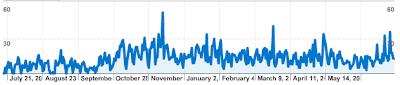
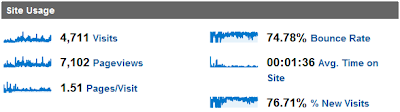
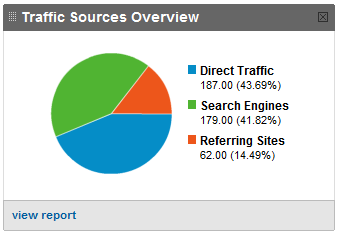
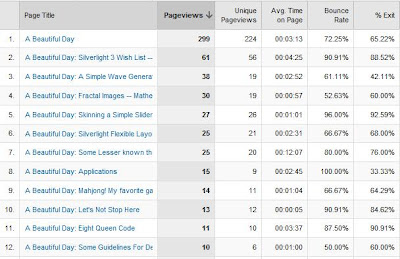
Thanks all for encouraging to continue this blog and I hope we will enjoy the future journey with Silerlight even more...
Here are some statistics of the blog through one year... (I use Google analytics for this blog)


Thanks all for encouraging to continue this blog and I hope we will enjoy the future journey with Silerlight even more...
Tuesday, July 14, 2009
How Hard Is It To Get Somebody Install Silverlight
Let me share a small conversation to my friend Melissa that just Happened. She is 100% non technical (Never heard of Silverlight) and just bought a new PC. Here is how I convince her to install Silverlight to her PC......
tanmoy says: hey
tanmoy says: did u install silverlight in ur computer
melissa says: ?
melissa says: no
tanmoy says: then do it.
tanmoy says: i m giving u the link
tanmoy says: http://www.microsoft.com/silverlight/
tanmoy says: it will ask u to install it
melissa says: I'm not downloading it
tanmoy says: y not. its from Microsoft so u can be sure its safe
melissa says: I don't need it
tanmoy says: u need it
melissa says: Why do I need it
tanmoy says: there are lots of site using silverlight
melissa says: So
tanmoy says: so if u install it u can see those sites, play games
tanmoy says: listen to music ,watch videos and all
melissa says: I can do all of that without it
tanmoy says: but its something I am working on
melissa says: Yeah
melissa says: Then its not that good to have lol
tanmoy says: yes it is
melissa says: No it's not lol
tanmoy says: why dont u do it....
melissa says: Why should I do it
tanmoy says: cause it only take 1 min to be done
melissa says: I just don't want ten million of things downloaded on this computer
tanmoy says: and it doesnt slow down ur comp
tanmoy says: its not that
tanmoy says: its very small thing. around 4 MB only
melissa says: k
melissa says: lol
melissa says: Fine ill do it
Finally.....
So now I do understand why people says might be as much as 40% of uses go away from a site that needs Silverlight without installing it.
BTW according to RIA Statistics Silverlight has gained around 30% of user base already. Impressive ha !
tanmoy says: hey
tanmoy says: did u install silverlight in ur computer
melissa says: ?
melissa says: no
tanmoy says: then do it.
tanmoy says: i m giving u the link
tanmoy says: http://www.microsoft.com/silverlight/
tanmoy says: it will ask u to install it
melissa says: I'm not downloading it
tanmoy says: y not. its from Microsoft so u can be sure its safe
melissa says: I don't need it
tanmoy says: u need it
melissa says: Why do I need it
tanmoy says: there are lots of site using silverlight
melissa says: So
tanmoy says: so if u install it u can see those sites, play games
tanmoy says: listen to music ,watch videos and all
melissa says: I can do all of that without it
tanmoy says: but its something I am working on
melissa says: Yeah
melissa says: Then its not that good to have lol
tanmoy says: yes it is
melissa says: No it's not lol
tanmoy says: why dont u do it....
melissa says: Why should I do it
tanmoy says: cause it only take 1 min to be done
melissa says: I just don't want ten million of things downloaded on this computer
tanmoy says: and it doesnt slow down ur comp
tanmoy says: its not that
tanmoy says: its very small thing. around 4 MB only
melissa says: k
melissa says: lol
melissa says: Fine ill do it
Finally.....
So now I do understand why people says might be as much as 40% of uses go away from a site that needs Silverlight without installing it.
BTW according to RIA Statistics Silverlight has gained around 30% of user base already. Impressive ha !
Monday, July 13, 2009
Understanding Animation
From childhood we all are fascinated by one thing- movement of static objects or Animation. I feel the best part in Silverlight is its ability to animate things and fascinate its users. Animation always doesn't mean make a man run or breaking a table. Simple page transitions in a site or changes in the button when you hover over it , also comes under animation. So lets see how beautiful this animation can be. First we will animate a simple ball (an ellipse in technical terms!) using blend and then in the next part we will do the same animation from the code behind. So lets begin with it.
First rule in animation which I follow is to picturize it in your mind. So here is the picturization:
Lets think of a ball moving and falling in to a basket.
Here is the application in action
First rule in animation which I follow is to picturize it in your mind. So here is the picturization:
Lets think of a ball moving and falling in to a basket.
Here is the application in action
- For the representation of the ball we would need something that looks like a ball. The closest would be an ellipse.
- Now, think of the movement of the ball. The ball should bounce and roll over.So we would have to create a ground for it and keep this in mind. for the ground we can think of rectangle with a skew.

- Next, we would have to think about the basket where we would be putting the ball. That can be again 2 ellipses with a skew(i mean a twisted ellipse). To give it an actual basket's feel we will take three such ellipses.


We would add few paths to make it look like a net. We have completed our picturization and now that it really looks like a basket ball court, let's begin with the animation!
We have completed our picturization and now that it really looks like a basket ball court, let's begin with the animation!We can create storyboard and give timelines to it, so as to achive the movement of the ball.Here I have given the ball only two types of transformation i.e rotate transform and translate transform.
Rotate transfrom would give the ball its rolling over kind of effect, whereas, translate transform(TranslateTransform.Y, TranslateTransform.X) would give it the up and down motion or translation in x and y directions. To adjust the timeline, you just have the drag the white point! It is so easy!! Let us see the final animation!
To adjust the timeline, you just have the drag the white point! It is so easy!! Let us see the final animation!In the next post you will see this animation done entirely in code.So keep watching this space!
Subscribe to:
Posts (Atom)