Well ... Of course you know some of them ... Here are they ...
1. When you install Silverlight toolkit, a sample page gets into your machine: You can open the page and have a quick look at the controls. Default location is ...
C:\Program Files\Microsoft SDKs\Silverlight\v4.0\Toolkit\Apr10\Samples\default.htm
You also get the toolkit document in
C:\Program Files\Microsoft SDKs\Silverlight\v4.0\Toolkit\Apr10
2. My domain hosting company doesn't support .xap MIME type: The solution is to change your .xap extension to .zip and it will work. Don't forget to change this in the Object tag source param also. One tiny problem with this approach is that your Splash screen (That you built using plain old XAML and JavaScript) won't work.
3. MouseLeftButtonDown event is not fired when there is no background specified: When you write an mouse event in a Panel you need to specify some background. So if you want to make the background transparent add Background="Transparent" instead of leaving it blank. This is true for other FrameworkElements too (Like Fill in Rectangle)
4. You can specify your custom xml namespaces with default url: You need to add XmlnsDefinitionAttribute in AssemblyInfo.cs file and give an unique url as xml namespace. For example [assembly:XmlnsDefinition("http://mrgni.com","TestLibrary")]
5. You can go full-screen automatically: Well only for Out of Browser applications with elevated trusts. And guess what? All keyboard controls work there.
6. There is no cross domain restriction when your application runs in elevated trust: Well isn't it nice? For elevated trust you can work with COM components. Specially helpful for working with Microsoft Office documents. But whatever you do You can not go Administrator mode in elevated trust mode.
Thursday, September 9, 2010


Monday, June 28, 2010
Zakumi Fan Club Is Live
My first hobby website goes online. You can see it live in http://mrgni.com
[ UPDATE: ZFC is selected in Silverlight showcase. ]
It is made with Silverlight 4.
You can get the full source code [ Except the database connection string. ] in codeplex.
Features...
1. There are 4 main tabs in the site. Teams N Results, About ZFC, Gallery and News.
2. Teams N Results shows the information/standing of teams, groups, schedule and next match in local time.
3. About ZFC is stuffed with FAQ and information about the site and Zakumi.
4. Gallery shows photos related to current world cup. It also has an option to like this application and share this in Facebook if you connect with Facebook.
5. News tab displays what people are saying related to FIFA in Facebook and twitter. It also gives you the facility to search in those sites. If you login with Facebook you get an option to see what your friends are saying about the current World cup. It also shows news from FIFA website feed.
Development story ...
Design ...
I have started this project long time back. The initial problem I faced is to finalize the design ... It was like ...
1. You create a new design
2. Make it live [ Make the user interface in xaml ]
3. Show it to your friends.
4. Scrap it.
5. Go to step 1.
Here are the things I listed down before starting the project
[ And here is what it has become when I finalized the design ]
1. The background will be light and text dark.
[Opposite. Though I tried to maintain the contrast. ]
2. It should fit in any browser resolution. [ Lower limit 1024 x 768 ]
[It was so difficult that finally I made it 998px wide. Though it should not look bad at higher resolutions ]
3. All texts and fonts should be highly readable.
[ Most of the time yes. In a few cases no. ]
4. There must be a logo.
[There is. This is what you can create within an hour or so. It looks pretty horrible. ]
Here was the design I came up with, at my second try ...
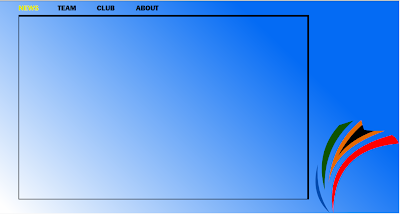
And here how it looks after its finished ...

Both of them are direct screen shots of live site ... not the photoshop mock design.
Development ...
Source control: Used TFS 2010 with codeplex as source control. And believe me it helped me a lot more than what I initially expected.
Connect with Facebook: I am using Facebook Developer Toolkit for it. The problem is it uses the old Graph API and has some small bugs in it. Also it is a heavy weight library that is not required for my website.
Animations: The site is pretty dull. There are only a few very simple animations. It is mainly because of lack of planning and time.
Web services and Database: I am using WCF services and MS-SQL server for DB. ADO.NET entity models as ORM. It went smoothly but there are some improvements can be done.
[ The website is not updated with the latest results and 2nd round matches yet ]
Thanks,
Tanmoy
[ UPDATE: ZFC is selected in Silverlight showcase. ]
It is made with Silverlight 4.
You can get the full source code [ Except the database connection string. ] in codeplex.
Features...
1. There are 4 main tabs in the site. Teams N Results, About ZFC, Gallery and News.
2. Teams N Results shows the information/standing of teams, groups, schedule and next match in local time.
3. About ZFC is stuffed with FAQ and information about the site and Zakumi.
4. Gallery shows photos related to current world cup. It also has an option to like this application and share this in Facebook if you connect with Facebook.
5. News tab displays what people are saying related to FIFA in Facebook and twitter. It also gives you the facility to search in those sites. If you login with Facebook you get an option to see what your friends are saying about the current World cup. It also shows news from FIFA website feed.
Development story ...
Design ...
I have started this project long time back. The initial problem I faced is to finalize the design ... It was like ...
1. You create a new design
2. Make it live [ Make the user interface in xaml ]
3. Show it to your friends.
4. Scrap it.
5. Go to step 1.
Here are the things I listed down before starting the project
[ And here is what it has become when I finalized the design ]
1. The background will be light and text dark.
[Opposite. Though I tried to maintain the contrast. ]
2. It should fit in any browser resolution. [ Lower limit 1024 x 768 ]
[It was so difficult that finally I made it 998px wide. Though it should not look bad at higher resolutions ]
3. All texts and fonts should be highly readable.
[ Most of the time yes. In a few cases no. ]
4. There must be a logo.
[There is. This is what you can create within an hour or so. It looks pretty horrible. ]
Here was the design I came up with, at my second try ...

And here how it looks after its finished ...

Both of them are direct screen shots of live site ... not the photoshop mock design.
Development ...
Source control: Used TFS 2010 with codeplex as source control. And believe me it helped me a lot more than what I initially expected.
Connect with Facebook: I am using Facebook Developer Toolkit for it. The problem is it uses the old Graph API and has some small bugs in it. Also it is a heavy weight library that is not required for my website.
Animations: The site is pretty dull. There are only a few very simple animations. It is mainly because of lack of planning and time.
Web services and Database: I am using WCF services and MS-SQL server for DB. ADO.NET entity models as ORM. It went smoothly but there are some improvements can be done.
[ The website is not updated with the latest results and 2nd round matches yet ]
Thanks,
Tanmoy
Monday, February 8, 2010
Zakumi in XAML
I have made a vector (Xaml) image of the world cup 2010 Mascot Zakumi. Feel free to use/modify it if you want.

You can download it from here.

You can download it from here.
Tuesday, November 3, 2009
Shifting To Opera Again
I was an "Opera Fan" on my last college years but submitted to Firefox since then. In last couple of days I downloaded latest version of Opera (10.1) and started using it again. And guess what. I simply amazed. I will be using it as default on my laptop. There are some features that really makes it useful. Yes besides "Kool".
1. Fastest back button: [ Back button works immediately. Probably it caches the pages in memory but who cares...] This specially helps me playing browser based massive multilayer games ( You know one second delay might means a lot in your bad times )
2. Speed Dial: Ok ok. Other browsers do support it. Still there are some features like making it highly customizable keeps Opera apart.
3. Notes: You can keep notes in your browser. and you don't need an extra plug-in for it.
4. Opera turbo: Admit - We all have slow Internet connections here in India. Don't we? Turbo makes highly compressed page and a little bit reduced image quality to fight that to 80%.
5. Opera links: Keeps your bookmark with you... wherever you are. [Except inside mariana trench probably ]
6. Ctrl + Z works: It reincarnate the closed tab. It is there with other browsers but not with fav ctrl + z.
7. Go to web address: Have a link in a page but not hyper-linked? Just right click ( or double click ) and select "Go to web address".
8. opera:config: Present in Firefox [about:config] but not in so organized and friendly manner.
9. Most perfect in following web standards: Only living browser with score 100/100 in ACID 3 test.

1o. Easter eggs n more: Till now I found .
a. Type /. in the address bar. It will take you to slashdot.org.
b. opera:drives will show the drives with directory ad all.
Saturday, July 18, 2009
One Year of "A Beautiful Day"
My journey with Silverlight started about 1 year before I started this blog. My first "Professional Program" was in Silverlight and after that I went deep into other parts of web development forgetting Silverlight for a while. With Silverlight 2 beta, I again started looking at Silverlight and I started "Loving it".
In the Journey I have meet many people smarter than I and tried to learn from them. I meet many people who has become my good friends.
In the Journey I have meet many people smarter than I and tried to learn from them. I meet many people who has become my good friends.
What I always lacking was "Design mind set". When I meet Ramya I found she got the exact part that I am missing to make a good application. You already have seen her making a simple but elegant animation example.
Here are some statistics of the blog through one year... (I use Google analytics for this blog)
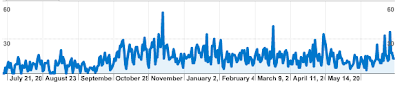
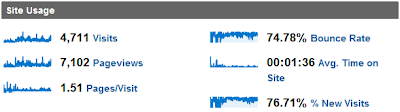
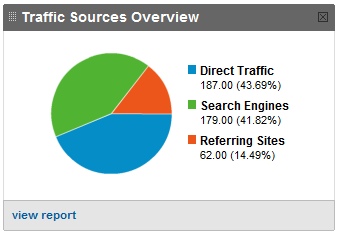
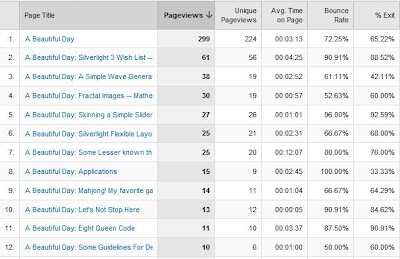
Thanks all for encouraging to continue this blog and I hope we will enjoy the future journey with Silerlight even more...
Here are some statistics of the blog through one year... (I use Google analytics for this blog)


Thanks all for encouraging to continue this blog and I hope we will enjoy the future journey with Silerlight even more...
Tuesday, July 14, 2009
How Hard Is It To Get Somebody Install Silverlight
Let me share a small conversation to my friend Melissa that just Happened. She is 100% non technical (Never heard of Silverlight) and just bought a new PC. Here is how I convince her to install Silverlight to her PC......
tanmoy says: hey
tanmoy says: did u install silverlight in ur computer
melissa says: ?
melissa says: no
tanmoy says: then do it.
tanmoy says: i m giving u the link
tanmoy says: http://www.microsoft.com/silverlight/
tanmoy says: it will ask u to install it
melissa says: I'm not downloading it
tanmoy says: y not. its from Microsoft so u can be sure its safe
melissa says: I don't need it
tanmoy says: u need it
melissa says: Why do I need it
tanmoy says: there are lots of site using silverlight
melissa says: So
tanmoy says: so if u install it u can see those sites, play games
tanmoy says: listen to music ,watch videos and all
melissa says: I can do all of that without it
tanmoy says: but its something I am working on
melissa says: Yeah
melissa says: Then its not that good to have lol
tanmoy says: yes it is
melissa says: No it's not lol
tanmoy says: why dont u do it....
melissa says: Why should I do it
tanmoy says: cause it only take 1 min to be done
melissa says: I just don't want ten million of things downloaded on this computer
tanmoy says: and it doesnt slow down ur comp
tanmoy says: its not that
tanmoy says: its very small thing. around 4 MB only
melissa says: k
melissa says: lol
melissa says: Fine ill do it
Finally.....
So now I do understand why people says might be as much as 40% of uses go away from a site that needs Silverlight without installing it.
BTW according to RIA Statistics Silverlight has gained around 30% of user base already. Impressive ha !
Monday, July 13, 2009
Understanding Animation
From childhood we all are fascinated by one thing- movement of static objects or Animation. I feel the best part in Silverlight is its ability to animate things and fascinate its users. Animation always doesn't mean make a man run or breaking a table. Simple page transitions in a site or changes in the button when you hover over it , also comes under animation. So lets see how beautiful this animation can be. First we will animate a simple ball (an ellipse in technical terms!) using blend and then in the next part we will do the same animation from the code behind. So lets begin with it.
First rule in animation which I follow is to picturize it in your mind. So here is the picturization:
Lets think of a ball moving and falling in to a basket.
Here is the application in action
First rule in animation which I follow is to picturize it in your mind. So here is the picturization:
Lets think of a ball moving and falling in to a basket.
Here is the application in action
- For the representation of the ball we would need something that looks like a ball. The closest would be an ellipse.
- Now, think of the movement of the ball. The ball should bounce and roll over.So we would have to create a ground for it and keep this in mind. for the ground we can think of rectangle with a skew.

- Next, we would have to think about the basket where we would be putting the ball. That can be again 2 ellipses with a skew(i mean a twisted ellipse). To give it an actual basket's feel we will take three such ellipses.


We would add few paths to make it look like a net. We have completed our picturization and now that it really looks like a basket ball court, let's begin with the animation!
We can create storyboard and give timelines to it, so as to achive the movement of the ball.Here I have given the ball only two types of transformation i.e rotate transform and translate transform.
Rotate transfrom would give the ball its rolling over kind of effect, whereas, translate transform(TranslateTransform.Y, TranslateTransform.X) would give it the up and down motion or translation in x and y directions. To adjust the timeline, you just have the drag the white point! It is so easy!! Let us see the final animation!
In the next post you will see this animation done entirely in code.So keep watching this space!
Wednesday, July 1, 2009
Some of the books in my collection
Most of the things I know are from internet blogs and community and from practical experience of me or other people.
Still I like reading books and for in depth knowledge it is something you can not skip. Here I am sharing some of the books I have (I am reading them too) and some of the books I wants to buy soon.
I have already
1. Code Complete 2nd Edition.
2. Joel on Software.
3. More Joel on Software.
4. LINQ in action
5. Silverlight 2 in action.
6. C# 3.0 in a Nutshell.
7. C# in depth.
8. CLR via C#
9. JavaScript the good parts.
I want to buy
1. Mastering Regular Expression.
2. The Pragmatic Programmer.
3. JQuery in Action.
4. Data Driven Services with Silverlight 2.
5. Dont make me think.
I have already read some parts of Code Complete, Mastering Regular Expression from library and I can tell you these two books are great.
As you might seen I only have one book on Silverlight. I could not start this book yet. I will let you know more about the books when I finish them.
Please share your favorite books too.
Wednesday, June 24, 2009
Silverlight and LINQ
I got a thread in Silverlight forum that asks how to select a row in a DataGrid?
Now here is the ans using a simple LINQ query.
MyClass item = MyDataGrid.ItemsSource.Cast().Where((_, pos) => pos == row_number).SingleOrDefault();
Now we have the data grid named MyDataGrid and we have already populated it with a collection of MyClass. We are using extension methods of C# 3.0 to help us select a row where row number is known.
In the lambda expression
(_, pos) => pos == row_number
we do not care about the first parameter so I have replaced it with '_'. (Remember '_' is a valid C# identifier).
LINQ has a great power to make your code compact and less error prone. Still I see many people using lengthy (Wrong?) way of doing simple things like selecting from a list where the list value satisfy a certain condition. Many people still things LINQ as an Syntactic Sugar of SQL queries. You can obviously use LINQ to SQL for interacting with database but LINQ is not only that.
LINQ comes in handy while parsing XML too.
Other benefits are like Sorting, advance selection and searching.
Tuesday, May 12, 2009
Silverlight kid is here.......
Hi All,
I was never interested in coding but the moment my mentor Mr. Deepak Sharma asked me to learn silverlight, I fell in love with it. The first thing which I ever made in my life was a christmas card in silverlight 1.0, and fortunately everybody liked it. From then onwards there was no looking back.I continued to experiment with it. Silverlight has cast a spell on me and Tanmoy has always increased my interest in it .And now when Tanmoy asked me to contribute in this blog, I was thrilled.I would try to keep this spirit of silverlight alive in me and would try to enlighten others with the knowledge I acquire in this journey.
Thanks to Tanmoy!
Introducing Ramya...Another Silverlight Geek
Hi,
to make this blog more effective I requested Ramya to join this blog. She has started her programming career with Silverlight and proved excellence in a very short time. Its a great thing that from now we two will be reviewing our posts and can keep posting while the other one is busy. It will increase the quality and number of posts.
Silverlight rocks as she does.
Lets welcome her....
~Tanmoy
Saturday, May 2, 2009
Silverlight 3 Wish List ---- What We Got
Hi all,
Silverlight 3 Beta is released. Now it does fulfill many of the features that the community has hoped for. Joe Stegman has marged the Silverlight 3 wish lists from different sources (Including the thread I have started) and put them in a table sorted on popularity. Lets check it with what we got. This is partial and please help me complete it and let me know in cases I am wrong.
Thanks...
Silverlight 3 Beta is released. Now it does fulfill many of the features that the community has hoped for. Joe Stegman has marged the Silverlight 3 wish lists from different sources (Including the thread I have started) and put them in a table sorted on popularity. Lets check it with what we got. This is partial and please help me complete it and let me know in cases I am wrong.
| Feature | Count | Comments | Status | Note |
| Web camera and/or microphone input | 33 | Includes requests for just microphone as well | No | |
| Bitmap APIs | 26 | Support get/set pixels and/or rendering a XAML scene to a bitmap. | Partial. (After reading the comments and in forums and agree with it) | Check this application. |
| Full 3D | 24 | Full 3D support (full 3D models) | Partial | Video1 Video2 |
| Printing | 20 | Printing APIs | No | |
| Offline and/or out of browser support | 16 | Support running Silverlight when not online (or completely out of the browser) | Yes | Video |
| Bi-directional text and/or complex script | 9 | No | ||
| UDP/P2P | 9 | UDP APIs generally for Peer to Peer support | No | |
| Rich text support | 8 | Editing and display | No | |
| Right mouse button | 8 | Ability to configure the right click | No | |
| Text quality | 8 | Improved text quality | Partial | Clear type will be supported |
| HTML Integration | 7 | Support HTML hosting (live HTML documents) and/or HTML translation | No | |
| Interactive designer | 7 | Support an interactive designer in Visual Studio | No | Will be with VS 2010 |
| Support more than BasicHttpBinding | 7 | Most common request is for WSHttpBinding | No | |
| Improve Silverlight/WPF compatibility | 6 | Mostly feature requests for either Silverlight and/or WPF | Partial | Gap is reducing over time |
| More controls | 6 | Random/general requests | Yes | With the new toolkit release it increases. |
| SaveFileDialog | 6 | Yes | ||
| Data and/or property triggers | 5 | No | ||
| Reporting services | 5 | No | ||
| Synchronous web service calls | 5 | No | Is it really needed? | |
| ADO.NET DataSet/DataTable | 4 | Partial | Check out new data controls and RIA services. | |
| Alpha video | 4 | Chroma key support | ||
| Clipboard support | 4 | No | Some people think of it as security threat. Workaround | |
| Drawing APIs (immediate mode) | 4 | Pixel effects? | ||
| Element name binding | 4 | Element to element binding is now possible. | ||
| Improved DataGrid | 4 | Several different requests | ||
| Local relational database (SQL) | 4 | |||
| Modal dialog | 4 | |||
| Mouse wheel | 4 | API and support in existing controls | No | Helper class available |
| Selectable text | 4 | |||
| Assembly caching | 3 | Want a framework for downloading/managing assemblies | Yes | Here. |
| Credentials/auth | 3 | Requests for networking stack and ASP.NET type integration | ||
| Custom markup extensions | 3 | No | ||
| Multi-target DLLs for .NET/SL | 3 | Build a business object DLL once for both .NET and Silverlight | No | |
| Multi-touch support | 3 | |||
| Path Animation | 3 | No | ||
| Speech and better audio decoder | 3 | |||
| VisualBrush | 3 | No | ||
| 9 Grid | 2 | |||
| Better keyboard APIs | 2 | Platform independent keycode | ||
| Better SEO | 2 | Yes | Check this blog. | |
| Binding support to anonymous types | 2 | |||
| Direct database access | 2 | OLEDB/ODBC equivalent | No | |
| Flow panel | 2 | |||
| GIF support | 2 | No | Probably it wont be there. See what Pete Brown says. | |
| Global/dynamic styles (skinning) | 2 | |||
| Integrated CTRL+F (in page search) | 2 | |||
| Sound APIs (equalizer) | 2 | Includes looping | No | |
| TileBrush (Image Tiling) | 2 | No | ||
| XPS Support | 2 | |||
| 64-bit platform support | 1 | |||
| Android support | 1 | |||
| Better N-tier support | 1 | Improved data access | Yes | RIA Services |
| Better SharePoint integration | 1 | |||
| Block style text | 1 | Bulleted lists, paragraphs | No | But check this out |
| Cell based animation | 1 | |||
| CollectionView | 1 | |||
| Color management | 1 | |||
| Digital/XAP signing | 1 | |||
| Double Click event | 1 | No | work around | |
| Drag and Drop | 1 | Between the desktop and Silverlight | No | |
| Full 5.1 sound | 1 | Currently fold down to stereo | No | |
| IDataErrorInfo | 1 | |||
| Inverse kinematics (bones) | 1 | Flash 10 feature | ||
| MediaTimeline | 1 | |||
| Multi-binding | 1 | |||
| Navigation model | 1 | Includes browser history integration | Yes | Video |
| Validation controls | 1 | Yes | Check this. | |
| XPATH support for data binding | 1 |
Thanks...
Friday, February 6, 2009
Some Guidelines For Developing Silverlight Applications
Hi,
Here are some basic guidelines for building Silverlight applications. They are based on the problems I have faced and seen. Keep in mind none of them are rules, and you can (you should actually) follow only some of them as it suits.
1. Use source control :
Use source control even if you are solo developer.
2. Plan all user controls as early as possible:
Plan your modules early. This will help you plan how to do interaction between them early and you don't have to do some ad-hock fix later. Create them and have some basic methods like Initialize and Deinitialize inside them.(see point 5)
3. Separate each part into a user control:
a. It will help many people working in the same application without much side effect on another control.
b. It helps isolate any problem to a small region so that it would become easy to rectify it.
c. It helps reuse the same control in different places.
Add some classes for basic functionality like checking for URL format or parsing an xml. You can make separate library if they are big enough.
4. Loaded event is harmful:
Do not rely on the loaded events. Why? In one application I was adding and removing an user control when needed, dynamically from code. Each time I was not creating a new object. Instead I was reusing the same one. Now I have attached the MouseLeftButtonDown event inside the loaded event of that user control. What was happening is this. Each time I was adding the user control the loaded event was getting fired and the event was been attached again. So the event handlers are fired multiple times. So adding and removing the user control a few times was making the application run very slow. It took me a hell lot of time to find out why.
So where to put the event handlers? See below.
5. Initialize and Deinitialize :
Put one Initialize and one Deinitialize public method in every user control you make. It is useful in many ways.
a. You can add the event handlers and other code that must run only once inside Initialize
method.
b. You can pass parameters to Initialize method without disturbing the constructor signature
or adding a new constructor. So new YourUserControl ( ) will always work.
c. You can use Deinitialize method to clean up the control. This is specifically required when
you are showing some customized content to the user and need to change it when user
signs out or another user signs in.
Now while creating the user control for the first time you should call the Initialize method with proper parameters.
One disadvantage of this approach is it has the feeling of evil destructors in c++. You need to be careful while calling these two methods.
6. Don't put your event handlers from xaml:
While is perfectly legal to add event handlers from xaml it is better to do it from code. Reason is...
a. Xaml belongs to designers. Event handling belongs to programmers. So its easy to attach
or detach event handlers from code without disturbing the xaml.
b. Suppose you have attached event handler to a control from code. Now if the name of the
control is changed or the control is been removed from xaml you will get an compilation
error with clear meaning. Now if you have written the event handler from xaml and
removed the appropriate method from code you will get an exception with less clear
message.
7. Select your layout carefully:
Take time to select proper layout. I can assure you it will save a lot of your time debugging later. Take your design mock up and think about how you can make the layout. Understand advantages and limitations of Grid, StackPanel, Canvas, Border, Popup, ScrollViewer etc. Some tips for choosing layout.
a. Most of the time you will find Grid is suitable for the top level container (root). This is specially true if your Silverlight application is occupied total page. You will find it containing header, footer and sometimes left and right module. These can be easily done with dividing main root grid with columns and rows.
b. For very complex structures inside the application you will find Canvas is best fitted. Specially if its height width is specified and has overlapped controls inside it.
c. While you are dividing your grid with rows and columns sometimes you will find you need only columns or only rows. Its time for choosing a StackPanel with proper orientation specified. StackPanel also adjust its children while new child is added or removed.
Though its personal preference I prefer to do the top level layout from Visual Studio or at least check the xaml structure in visual studio after making it in blend. It helps prevent some properties getting set automatically without your knowledge and to remove redundant code.
8. Avoid specifying height and width explicitly:
Make your application layout such a way you don't have to specify height and width for each control. Grid has many flexible features like Horizontal and Vertical Alignments, Row and Column properties. Use them wisely. If you make your layout structure carefully you will find most of the time you can avoid using height, width and margin. Also try to avoid negative values in margin. Most of the time it means you have chosen wrong horizontal alignment or vertical alignment property.
9. Don't put any secret inside your code:
Silverlight is a client side technology. Keep in mind all your code goes into users machine and can be easily decompiled to view the code. So never put any sensitive data inside code. Security is the most critical part in today's internet. Security is invisible as long it protects you but it is needed most. Think carefully and from the design phase of your application about security. Don't rely on security through obscurity.
10. Test individual user control:
After creating a user control run it directly from app.xaml.cs by setting the root visual to the control. Call initialize method with proper arguments and check if it works as expected. Test the application thoroughly and fix the slightest defect you found.
11. Don't use image as a button:
In Silverlight 1.0 we did not have any button control so we used some xaml or image for button.
In Silverlight 2 use a button and style it appropriately. It helps in the following way...
a. Maintaining states like mouse over or pressed.
b. Basic functionality like click. (No, click is not same as MouseLeftButtonDown event)
c. Use the same style without copying whole xaml.
This is also valid for all other controls.
12. Don't put redundant code:
Your code should look beautiful. Remove redundant code and simplify the logic as fer as possible. Auto generated codes sometimes generates lot of extra code if you use them in a wrong way. Clean them up.
13. Performance:
a. Reduce your xap size.
b. Reduce the loading time for total or different parts of your application.
c. Avoid windowless=true.
d. Crate vector graphics for simple images.
14. Use web services for server communication:
Silverlight runs on users machine so can not interect with server or database directly. There are many ways of doing it but the best and easiest way is using web services.
Use WCF services if possible.
15. Use Isolated Storage, but carefully:
Use Isolated storage. But DO NOT put any sensitive data there.
Saturday, January 3, 2009
Some More Tips
Here are some Tips.....
1. Reducing xap size

Now you want to rotate it from its edge. You can see a small dot in the center of the rectangle like the following in blend design view when you select the rectangle.

That dot defines render transform origin or the origin of all the transformation that will be applied to the rectangle. Now you can drag the small dot to the edge of the stick and the stick (rectangle) will rotate from the edge like the below image.

5. How to set style from code?
That's it for now. Happy New year. :)
1. Reducing xap size
- Select Release in properties before moving the xap to the production and build.
- rename the .xap file to .zip. Extract the zip and then re-zip it. It generally decreases the size quite a bit.
- Use vector graphics instead of images.
- Load the assets on demand instead of packaging them in the xap.
- You can set a value (Say Width of a canvas) to Auto in xaml. How can you do it from code? Set canvas width = double.NaN.
- You get a new type of collection with Silverlight, called ObservableCollection. You can use this type of collection wherever you normally use a list. Like setting the ItemsSource of a ListBox. The benefit of using this over List is that it automatically updates the Items whenever the collection changes. This is really helpful for data binding.
- Suppose you have a red rectangle. Now if you rotate it with a storyboard it will rotate like the below image. i.e from center of the rectangle.

Now you want to rotate it from its edge. You can see a small dot in the center of the rectangle like the following in blend design view when you select the rectangle.

That dot defines render transform origin or the origin of all the transformation that will be applied to the rectangle. Now you can drag the small dot to the edge of the stick and the stick (rectangle) will rotate from the edge like the below image.

5. How to set style from code?
- You can apply a style in xaml like the following. Style="{StaticResource ButtonStyleKeyName}". Now if you want to set it from code do like the following. MyButton.Style = (Style)Resources["ButtonStyleKeyName"];
- Remember you can set style only once. So if you are trying to do like MyButton.Style = (Style)Resources["ButtonStyleKeyName2"]; After setting the style for the first time you will get an exception.
- Suppose someone viewing your website and does not have silverlight installed. You prompt him to download and install it. Now after installing the silverlight the page should be auto refreshed so he can see your silverlight application. If you use object tag and include Silverlight.js file this behavior is default. This line in Silverlight.js determines that. Silverlight.onSilverlightInstalled = function () {window.location.reload(false);}; Set the parameter to true if you want to bypass the cache.
- Could not find a way of doing this with asp:Silverlight tag still. Please tell me if you know the way.
- Check it here.
- The library dlls for Silverlight are in library folder inside Silverlight SDK. The default location for it is C:\Program Files\Microsoft SDKs\Silverlight\v2.0\Libraries. This is specially useful if you are adding any reference from Expression Blend.
- There are many solution for this. One quick way is to Add a random number in the querystring of the xap source. for ie Source="~/ClientBin/RotateExp.xap?rnd=029db68e-02c0-4dc8-a4f9-81b09f8000da"
That's it for now. Happy New year. :)
Tuesday, December 9, 2008
Silverlight Bookmark
Hi all,
For the last month I was a bit busy so couldn't post much in the blog. However I think its time to share some links. I am trying to group them so that they can be easy to maintain.
Documentation and Reference
1. MSDN Documentation
2. Silverligh Controls
3. Pattern and Practices
4. Silverlight 2 developer poster
5. Silverlight Deployment Guide.
Tips
1. Silverlight Tips
Extra Controls
1. http://www.codeplex.com/silverlightcontrib
2. http://www.codeplex.com/Silverlight
4. http://www.telerik.com/products/silverlight.aspx
5. http://www.componentone.com/SuperProducts/StudioSilverlight/
Some good sites and applications build in Silverlight
1. Hard rock memorabilia
2. A huge collection of Silverlight applications
Some good blogs
1. Tim Heuer's blog
2. Jesse Liberty's blog
3. Michael Sync's blog
4. Pete Brown's blog
5. Avi Pilosof's blog
6. Wilfred Pinto's blog
7. Shine draw
8. Scottgu's blog
9. Makram's Silverlight blog
10. MossyBlog
11. Shawn Wildermuth's blog
3D with Silverlight
1. http://www.codeplex.com/kit3d
Community Sites
1. Official Silverlight Community Site
2. Silverlight Show
I will try keep this updated. Also please add comments if you have some other good links and I will add them.
Tuesday, November 4, 2008
Silverlight Flexible Layout
Hi friends,
I have seen in Silverlight forums and other places that there are some confusions about Layouts. Specially how to give your Silverlight application a flexible layout that will be adjusted automatically as browser resize. Hope this post helps.
Basically there are two ways of doing it. One is from code where you will change the height,widths of controls as browser resizes. Another is creating layout as it automatically changes with browser resize. I will explain the later here.
Silverlight has 3 layout controls. Grid, StackPanel and Canvas. Canvas is NOT A FLEXIBLE ONE. Other two are. That does not mean you will not use Canvas but you will use it where you know the canvas does not have to be adjusted with browser resize.
So basically we will try building the following layout.

Now the top part is flexible provided that the text will come in middle. Middle green part is flexible but has a orange box in it that is fixed size. Bottom left red part is fixed but right skyblue part is flexible with text aligned to right.
Now come to the Page.xaml. There will be one LayoutRoot Grid is already defined. Now as you can see we will have 3 rows in the LayoutRoot Grid. Top white one middle one and bottom one.
We will set fixed height for top and bottom rows and let the middle row occupy the remaining height. I have given 100px for Top one and 100px for bottom one.
We will put one Grid for each row namely TopGrid, MiddleGrid and BottomGrid and set their Grid.Row property to 0,1 and 2 respectively.
Now we will define two columns for the BottomGrid. First one with fixed width ( 70 here) and the second one with remaining size. We will also add two Grids inside bottom grid and set Grid.Column to 0 and 1 respectively. We will name them as LeftBottomGrid and RightBottomGrid.
Now if you set the Grid backgrounds as the above image your application will look something like the following in the design view.

My Usercontrol width and height are 40o and 500 respectively.
Now we will add one textblock in the TopGrid and with text "WELCOME TO SILVERLIGHT" and set text align to center. Also set its vertical align ment to center.
We will add one canvas with orange background inside MiddleGrid and set its height and width to 100.
We will finally add another textblock in the RightBottomGrid with text "Code name Mrgni" and have its text alignment right. Also set its vertical alignment to center.
Now remove the height and width from the UserControl tag. It is required as we want our Silverlight application to Streach the entire div it has been assign to. Now run the application and here it goes....
Now here we have not used any relative positioning. But that can be done easily. Suppose you want the TopGrid to always have the height 100 but want the BottomGrid to have 1/5 th of remaining height and rest part to be occupied to MiddleGrid. Just change LayoutGrid's rowdefinitions as 100, 4*, 1* and you are done.
Here is the complete source for it. Please leave a comment if you have any doubt or any correction. I have done this application totally from Visual Studio but you can do it from blend as well.
Friday, October 31, 2008
Too Early For Silverlight 3?
Hi friends,
I am excited about what Silverlight 2 brings us. Still there are some features that we miss and might come in the next release. I have created a thread for Silverlight 3 Wish List in the Silverlight forums. Please add whatever you think might come in handy in next release. And yes Silverlight Team do care about the community.
I am excited about what Silverlight 2 brings us. Still there are some features that we miss and might come in the next release. I have created a thread for Silverlight 3 Wish List in the Silverlight forums. Please add whatever you think might come in handy in next release. And yes Silverlight Team do care about the community.
Sunday, October 19, 2008
A Simple Clock In Silverlight
Hi friends,
Friday one of my friends (Manasa) send me some unusual clocks developed in flash. That gave me the idea of making one of them (the easiest one) in Silverlight.
I made it like the following
The root canvas contains 7 canvases. Each of them holds seconds, minutes, hours and other texts and digits. Each of the canvas is wide enough to hold all the digits or text. The root canvas clips it to show only 450 pixel. The child canvases move right to left so it appears moving to the user.
Now lets see seconds panel. Others will be similar.
Seconds panel has 9 digits visible at any time. Total seconds panel contains all the digits and clipped by the root to show only 9 digits.
Seconds panel has got 69 digits 0 1 2 3.......58 59 0 1 2 3 4 5 6 7 8. Last 9 digits are added because when we shift the panel from right to left at time the viewable part will be 59 0 1 2 3 4 5 6 7 8.(half of 59 and half of 8) Then it will be again 0 1 2 3 4 5 6 7 8 and this time we can repeat the animation without letting user see any discontinuity.
Seconds, minutes and hours panels are been shifted through animations. Days, dates are updated once in an hour. Months are updated once in a day and years are once in a month. (Seeing it update will keep you open your browser at least a month though !!!)
When the application starts it updates so the red line shows current values.
You can find the complete code here.
Friday one of my friends (Manasa) send me some unusual clocks developed in flash. That gave me the idea of making one of them (the easiest one) in Silverlight.
I made it like the following
Brief Explanation
The root canvas contains 7 canvases. Each of them holds seconds, minutes, hours and other texts and digits. Each of the canvas is wide enough to hold all the digits or text. The root canvas clips it to show only 450 pixel. The child canvases move right to left so it appears moving to the user.
Now lets see seconds panel. Others will be similar.
Seconds panel has 9 digits visible at any time. Total seconds panel contains all the digits and clipped by the root to show only 9 digits.
Seconds panel has got 69 digits 0 1 2 3.......58 59 0 1 2 3 4 5 6 7 8. Last 9 digits are added because when we shift the panel from right to left at time the viewable part will be 59 0 1 2 3 4 5 6 7 8.(half of 59 and half of 8) Then it will be again 0 1 2 3 4 5 6 7 8 and this time we can repeat the animation without letting user see any discontinuity.
Seconds, minutes and hours panels are been shifted through animations. Days, dates are updated once in an hour. Months are updated once in a day and years are once in a month. (Seeing it update will keep you open your browser at least a month though !!!)
When the application starts it updates so the red line shows current values.
You can find the complete code here.
Thursday, October 16, 2008
Fractal Images -- Mathematics With Silverlight Again
Hi all,
When I first seen fractal images I was really impressed and wanted a bit try for making one myself. I have made a simple application that will generate some kool images based on fractal algorithms. This program is not for describing fractals, this is just to make some pretty images totally by complex mathematics.
here is one image that uses (Z * Z * Z + C) / (Z * Z * Z - C) formula and C=0.45 here. (C and Z are complex numbers)

You can make lots of images using different equation and different values of C.
How the Images are created.....
The image is actually a collection of 1 x 1 pixel ellipse different color. These ellipses are placed in a 500 x 600 Canvas. fractal algorithm determines how to color the ellipses and that is the only magic.
Algorithm.....
int iteration = 0;
do
{
R = (Z * Z * Z + C) / (Z * Z * Z - C);
Z = R;
iteration++;
} while (iteration < 100 && (R.Real * R.Real + R.Imaginary * R.Imaginary) < 4);
For coloring the ellipse
Random r = new Random(iteration);
byte red = (byte)r.Next(255);
byte green = (byte)r.Next(255);
byte blue = (byte)r.Next(255);
Plot(x, y, Color.FromArgb(255, red, green, blue));
Though it is using random number for same iteration value the color will be same as iteration is been used as seed for the random number. This is the beauty of pseudo numbers.
Here you can download the complete source code.
You can see the application running here.
One caution:- The code involve too many computation and placing 300000 ellipses. So it takes about 20 seconds to complete and might hang your browser during this time.
Here and here you can see details about fractals and algorithms.
I have updated some of my applications and posts in last few days. I will complete it as soon as I can.
Wednesday, October 15, 2008
SL 2 And All My Broken Applications
Silverlight 2 is released. Now it has some breaking changes that breaks all of beta 2 applications. Though Microsoft has given some time to update beta 2 application to RC0 so they will be compatible to final release I did not get time to update my applications that I will be doing when I get time. I will be making some other applications as well. I will have to update my posts so they are still relevant. Lots of changes....
Subscribe to:
Posts (Atom)